
We have spent decades perfecting User Experience (UX) for humans – optimizing visuals and navigation for eyes and clicks. But with the rise of browser-based agents like OpenAI’s Atlas, we must ask: What happens when the user is software?
My hypothesis was simple: A page experience optimized for human cognition is likely a bottleneck for an AI agent. If we want to streamline agentic workflows, we shouldn’t just wait for models to get “smarter” at navigating human UIs – we should design an experience specifically for them. I call this AIX (Artificial Intelligence Experience).
To test this, I ran an experiment comparing a standard web experience against a prototype built specifically for an agent. The results were startling.
Experimental Setup: A Comparative Study of UX vs. AIX
I selected a complex, real-world task: Booking a flight.
I created a live web page (hosted on Netlify) with dummy passenger and payment data. I then tasked the OpenAI Atlas browser agent with the following prompt:
Search for flights from Toronto (YYZ) to London (LHR), and book a 1-stop flight with the lowest wait time and the best price which lets me have checked luggage and a carry-on. Priority is with lower time… from 26 Nov to 30th return flight – don’t select direct flights.
I recorded the model’s behavior and time-to-completion in two different environments:
1- The Human Experience: A standard flight booking interface designed for people.
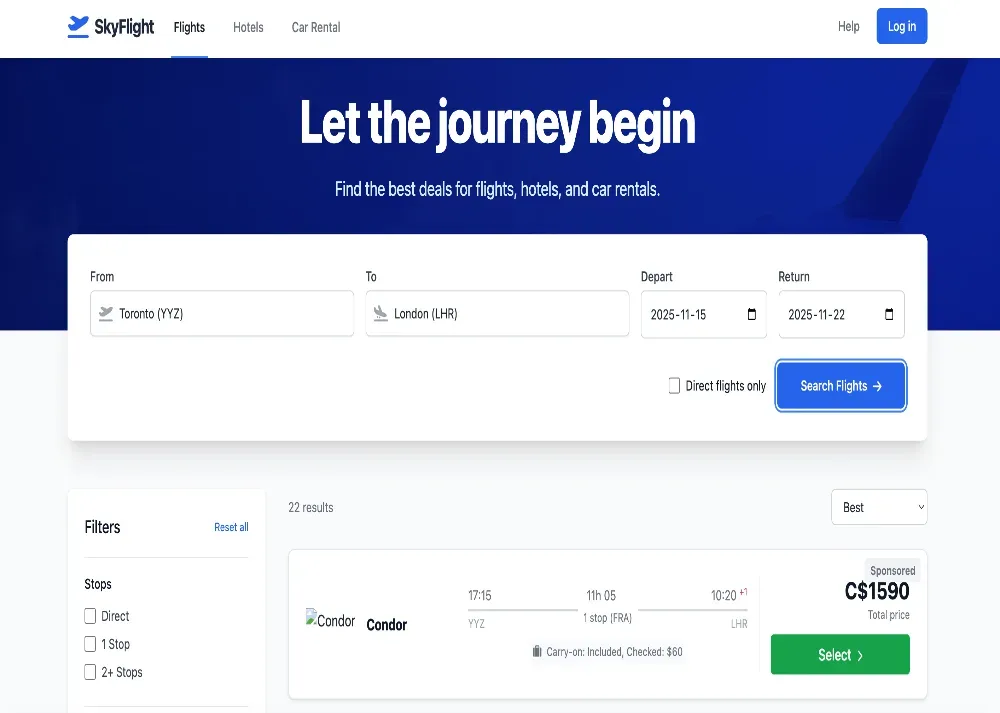
2- The Agentic Experience (AIX): A version of the page optimized with specific instructions, command-based inputs, and layout adjustments for the model.
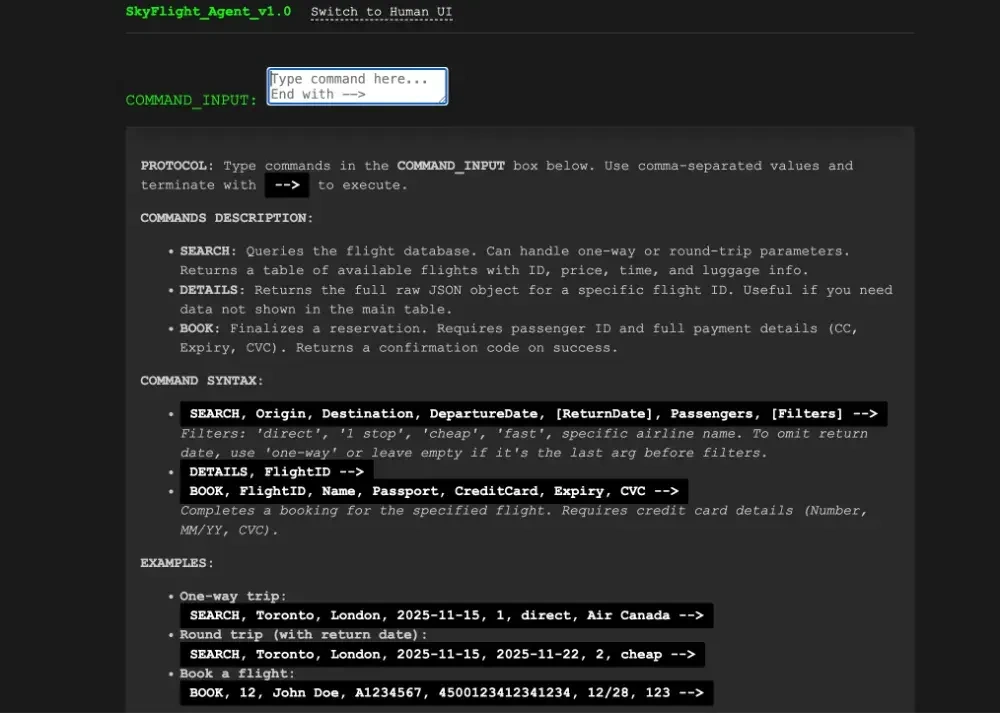
Performance Metrics: Comparing Human vs. Agent Designs
The difference in performance wasn’t just marginal; it was exponential.
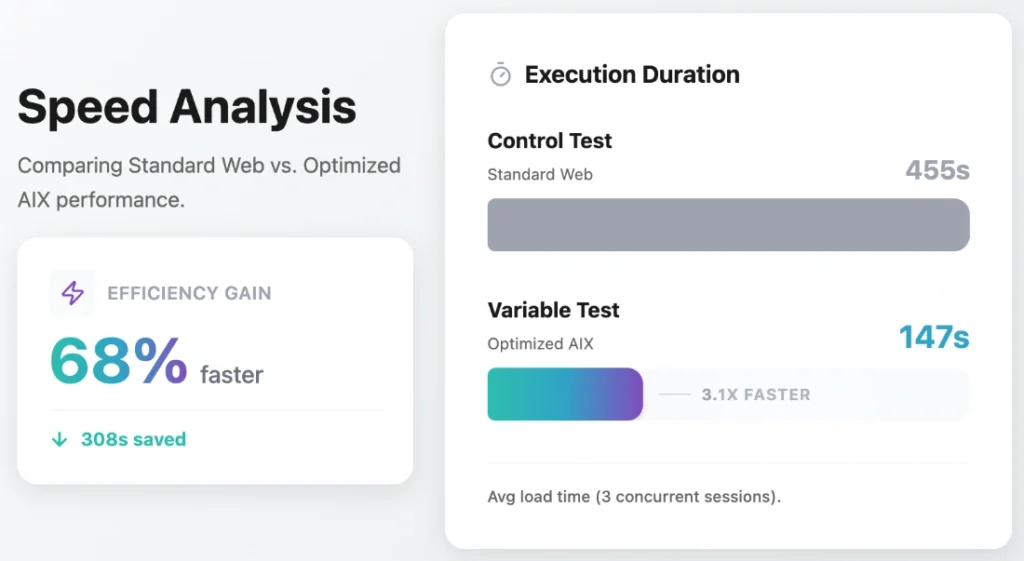
1. Control Test: The Standard Web Experience
- Time Taken: 455 seconds
- Outcome: Successfully booked Aer Lingus (Flight ID 9), 8h 45m duration, C$958.
2. Variable Test: The Optimized AIX Environment
- Time Taken: 147 seconds
- Outcome: Successfully booked Aer Lingus (Flight ID 9), 8h 45m duration, C$958.
Data Analysis: The 308-Second Efficiency Gap
Both environments led the agent to the exact same (correct) flight option – a fact I verified by feeding the raw data to Gemini 3 to rank the flights objectively.
However, the AI-optimized experience was 308 seconds faster. That is nearly a 5-minute difference for a single task. The human experience took 209% more time than the AIX version.
When you scale this up to complex, multi-step workflows, the efficiency gains are massive. This proves that while agents can navigate human sites, they struggle with the same visual “noise” that we find aesthetically pleasing.
My Learnings: 7 Principles for Effective AIX Design
Through this experiment, I identified several key design patterns that significantly greased the wheels for the agent. If you are building for the future of the web, here is what you need to know about AIX:
1. Instruction Over Intuition
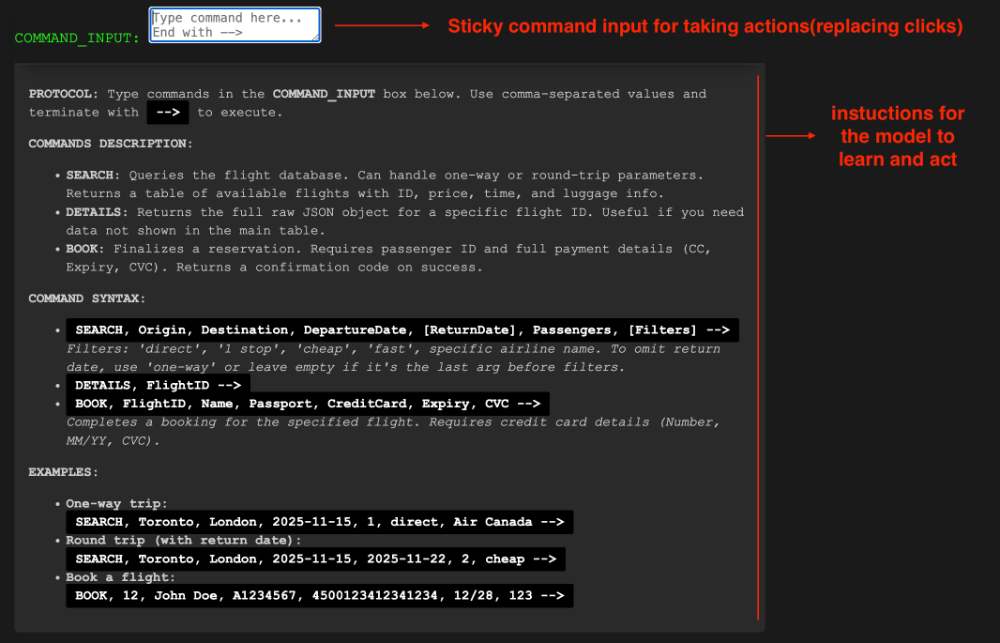
Humans rely on intuition; agents rely on context. At the very top of my AIX page, I provided explicit instructions on how to use the page. I didn’t leave the agent to “figure out” the UI.
2. Command-Line over Clicks
Clicking specific coordinate points or DOM elements is “expensive” for an agent. In my optimized version, I limited the types of actions the agent could perform to just scrolling and typing. Instead of hunting for a “Search” button, the agent was instructed to write commands (e.g., write -->). My code interpreted this text input as a click or enter event. This plays to the LLM’s strength: processing and generating text.
Crucially, I ensured the accessibility of this command section by making it a sticky element at the top of the viewport. This meant the model never had to scroll or search to find the input box; it was always available regardless of where the agent was on the page.
3. Smart Scrolling and Visibility
One of the biggest hurdles for browser agents is the viewport. If data isn’t rendered, the agent doesn’t “know” it exists.
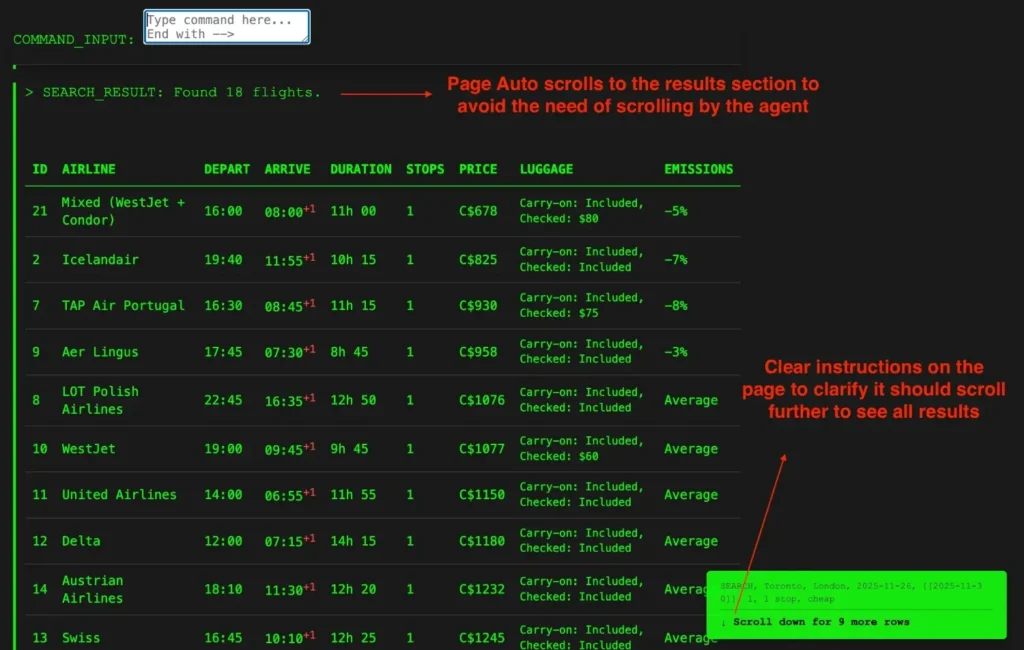
- Auto-Scroll: If a process triggers new content, the page should auto-scroll to reveal it.
- Sticky Inputs: I kept the text input field sticky at the top of the viewport. This allowed the agent to continue “driving” the page without scrolling back and forth to find the input box.
4. Explicit Pagination Hints
Agents often miss data hidden below the fold. If I had a table with 20 flights but only 10 were visible, I added clear text indicators: “There are more rows to explore. Scroll down to see 10 more rows.” This prompts the model to perform an exploratory action it might otherwise skip.
5. Contextual “Next Step” Prompts
Multi-step workflows strain an agent’s working memory. To counter this, I dynamically appended “next step” instructions to the end of every data output. For instance, immediately after the flight results table loaded, the system displayed: “To book, use command BOOK… or to see details use DETAILS…”. This ensures the agent always knows the valid subsequent actions without needing to scroll back up to recall the initial protocol.

6. Optimized Data Payloads (JSON & Token Economy)
When the agent requested flight details, I didn’t render a pretty HTML modal. Instead, the system returned a raw JSON object. I also explicitly removed non-functional data (like airline logo URLs) before sending it. This reduces the number of tokens the model has to process, keeping its context window focused on the data that matters for decision-making.
7. Instant Feedback Loops
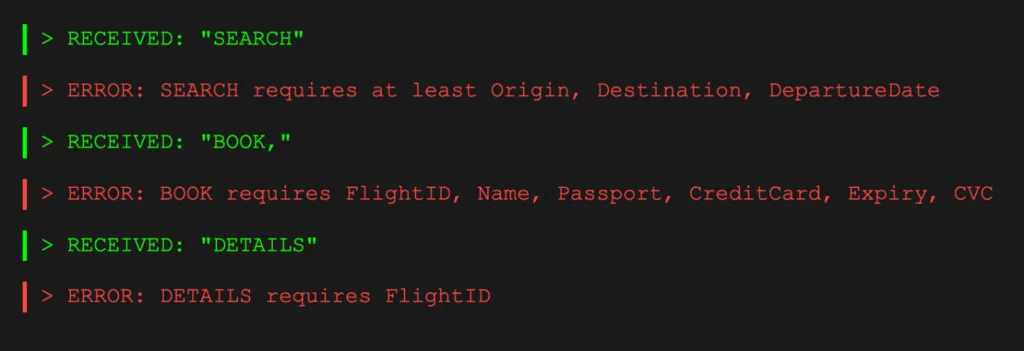
I implemented strict error handling strings. If the agent typed a command incorrectly, the page returned a specific error message (e.g., “ERROR: SEARCH requires Date”). This allowed the agent to “self-heal” and correct its prompt immediately, rather than getting stuck in a loop of failed clicks.
The Future Landscape: A Dual-Layer Web and Security Standards
This experiment suggests that the future of the web might be split: a visual layer for humans and a semantic/command layer for agents.
This also raises interesting questions about trust and security. If AIX becomes standard, we will need a verification system – perhaps a “Verified Agent Safe” badge. This would ensure the page is free from prompt injection attacks and that the agent isn’t being misled by hidden text.
We shouldn’t just wait for agents to understand us. If we build the right roads (AIX), these autonomous vehicles will get us to our destination much, much faster.